fotog

A camera that
teaches you.

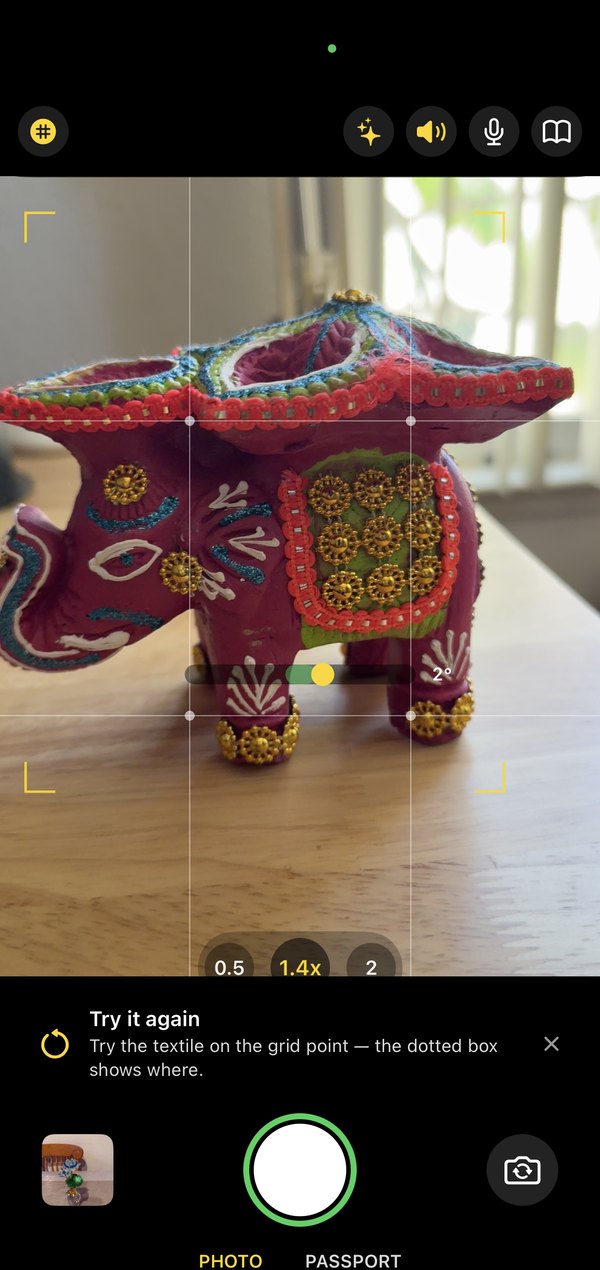
Point it at anything and it tells you, live, what would make the photo better. Straighten the horizon. Move the subject off centre. Step out of the backlight. One message at a time, outside the viewfinder, never over your picture.

Requires iPhone 15 Pro or later. Nothing leaves your phone.
Why Fotog
A photography teacher standing next to you.
◎

Live guidance, not filters

Level, exposure, focus, backlight, headroom, off-grid placement — seventeen things a good photographer checks without thinking. Fotog checks them for you and says only what matters, when it matters.

✦

A coach, not an auto-fixer

Tap Sparkles for measured goals with a finish line, and turn on Coaching to be talked through them one at a time. Ask a question by voice — "why is my photo blurry?" — and get a plain answer.

⇄

Lessons you can see

Retake a shot and Fotog shows both photos side by side with what actually changed, in numbers. Seven verdicts, no single score. Then you say which one you prefer — that's the answer that counts.

How it works
Shoot, listen, retake, compare.
1

Frame the shot

The grid, the level and the subject ticks show what the camera sees. A green ring means it's clean.

2

Read one message

If something's off, a single line tells you what. Warnings are instant; there's no nagging when it's fine.

3

Try it again

After an improvable shot, Fotog invites a second take and keeps the pair.

4

See what changed

Wipe between the two, read the rubric, and pick the one you like. Learn cards explain every term.

A compliant passport photo, at home.

Put the phone on a stand, switch to Passport, and follow the spoken checklist. Fotog checks head size, position and lighting against the US 2×2 inch template, counts down, and saves a 1200×1200 photo ready to upload or print.

No trip to a shop, no waiting, and the photo never leaves your phone.

Passport mode is a photography aid, not a government service. It helps you compose a photo to a standard template; it does not guarantee acceptance.
Free vs Unlock
Try it properly. Then buy it once.
Feature
FotogFree
Unlock$9.99 one-time
Live guidance, grid, level, subject ticks
✓
✓
Learn glossary — every term explained
✓
✓
Photo captures
20
Unlimited
Sparkles advice & coaching sessions
20
Unlimited
Passport mode, Ask by voice, Lessons
✓
✓
Accounts, uploads, ads, subscriptions
none
none
Support
We're here.

Contact Us

Questions, feedback, or something unexpected? Reach out directly and we'll get back to you.

Contact →

Privacy

Fotog has no accounts, no analytics, no ads, and no network code. Everything runs on your iPhone. Airplane mode is a feature, not a limitation.

Privacy Policy →

Requirements

iPhone 15 Pro or later, running iOS 26. Advice and voice answers use Apple's on-device models, which need the Pro-class chip. Voice coaching uses about as much battery as a video call.

More from Labham →